



Beyond the Gantt Chart: Mastering Modern Project Tracking Systems
In the fast-paced world of modern business, the ability to execute projects efficiently, on time, and within budget is the ultimate competitive advantage. As teams become more distributed and initiatives more complex, the methods we use to monitor progress must evolve. Gone are the days of static spreadsheets and siloed email updates. Enter the modern project tracking system: a dynamic, centralized platform that serves as the operational heartbeat of any successful project. By consolidating tasks, timelines, and resources into a single source of truth, a robust project tracking system provides the real-time visibility and data-driven insights necessary to navigate uncertainty, align teams, and turn strategic vision into tangible results.
What Is a Project Tracking System?
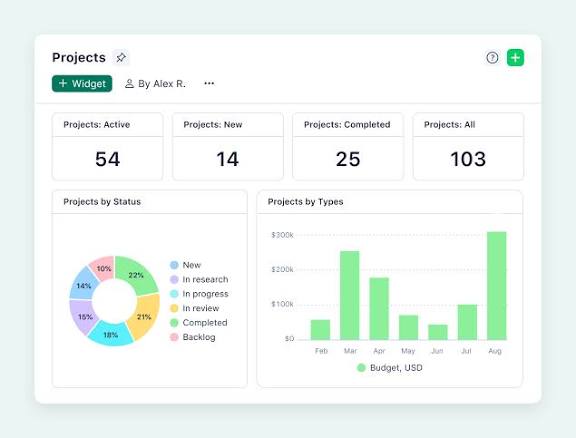
A project tracking system is a software tool that centralizes and monitors all moving parts of a project—including tasks, timelines, budgets, and resources—by comparing actual progress against the planned baseline . Unlike simple to-do lists, modern project trackers serve as a “living source of truth,” automatically updating as team members complete work, adjust deadlines, or add new tasks .
These systems leverage a variety of visual and analytical tools to provide real-time visibility. Common features include Gantt charts for timeline visualization, Kanban boards for workflow management, and customizable dashboards that surface key performance indicators . By centralizing project data, tracking systems eliminate the chaos of scattered spreadsheets and endless status-update emails .
Why Project Tracking System Matters
Effective project tracking is crucial throughout a project’s lifecycle because it enables early identification of variances from the project plan . Consequently, the statistics underscore its importance: according to recent industry research, only a fraction of companies consistently complete projects on schedule . Project tracking helps close this gap by providing:
Project tracking helps close this gap by providing several key advantages. For starters, it offers real-time visibility into timelines, budgets, and task status, allowing teams to detect and resolve potential issues before they escalate . Beyond that, it enables proactive decision-making through actionable data on progress, resource allocation, and potential bottlenecks . Most importantly, it ensures improved alignment among stakeholders by making sure everyone understands what’s happening, what’s next, and what needs attention.
Without proper tracking, projects quickly become disorganized, leading to missed deadlines, budget overruns, and team frustration .
Essential Features of Project Tracking Software
When evaluating project tracking systems, several core features distinguish effective solutions from basic task managers:
Task and Resource Management
The ability to create, assign, and manage tasks is fundamental. Specifically, effective systems allow project managers to break down work into discrete, owner-assigned tasks while providing visibility into who is doing what, when, and for how long . Furthermore, resource management features, such as workload reports, help balance team capacity and prevent burnout by showing who is overloaded and who is underutilized .
Real-Time Progress Tracking System
Modern project trackers provide live updates on task completion, upcoming deadlines, and potential challenges. More specifically, visual tools like Gantt charts offer project status at a glance, showing tasks that are on or behind schedule, dependencies, and responsible persons . Additionally, Kanban boards visualize workflow stages and help identify bottlenecks .
Time Tracking
Built-in time tracking allows teams to log billable and non-billable hours, monitor task durations, and generate client invoices directly from timesheet entries . This feature is essential for understanding resource utilization, identifying inefficiencies, and creating accurate estimates for future projects .
Reporting and Analytics
Comprehensive reporting transforms raw project data into actionable insights. Customizable reports and dashboards track key metrics such as task completion rates, budget vs. actuals, and team utilization . Advanced systems may offer features like Earned Value Analysis (EVA) and predictive alerts for cost or schedule risks .
Key Benefits of Implementing a Project Tracking System
Enhanced Project Visibility:
A project tracker provides continuous insight into how projects are performing, eliminating guesswork and enabling data-driven decisions .
Improved Time Management:
Time tracking features help teams monitor task durations, identify inefficiencies, and adjust timelines accordingly, leading to better resource allocation and more accurate estimates .
Increased Accountability:
When tasks and deadlines are clearly defined and visible, team members understand their responsibilities and can be held accountable for their contributions .
Streamlined Collaboration:
Real-time updates and centralized communication reduce information silos and ensure everyone stays aligned, particularly important for remote and distributed teams .
Data-Driven Insights:
Analytics and reports provide valuable information about project performance, helping teams optimize workflows and improve future Project planning
How to Track Project Progress Effectively
Successful project tracking requires a consistent, strategic approach. Follow these steps to implement effective tracking:
Establish Measurable Objectives:
To begin, before tracking can begin, define what success looks like. Specifically, set specific, measurable targets using frameworks like SMART goals or OKRs. For example, instead of vague objectives like “increase engagement,” aim for “boost email click-through rates by 20% in Q2” .
Build a Comprehensive Project tracking system:
Start by developing a roadmap that outlines tasks, timelines, milestones, dependencies, and assigned resources. Then, break larger initiatives into discrete tasks, group them into project phases, and estimate durations for each . Finally, tools like Gantt charts are invaluable for visually mapping the entire project .
Select the Right Tracking Tool:
Choose a platform that centralizes project data and provides visibility into assignments, deadlines, resource usage, and budgets. Look for pre-built templates, multiple view options (Gantt, Kanban, calendar), and dashboard capabilities .
Create a Communication Plan:
Establish expectations around how updates will be shared. Determine whether you will use weekly standups, automated dashboards, or regular review meetings. Ensure everyone knows when updates are expected and what information should be included .
Monitor Progress Regularly:
Schedule consistent check-ins to review progress against the plan. Daily 15-minute scans of dashboards can catch issues early. Watch for signals that something is off track, such as missed milestones or tasks that remain “in progress” too long.
Types of Project Tracking System Tools
The market offers diverse solutions catering to different needs, from simple task management to enterprise-grade project portfolio management:
Simple Task Management Tools of Project tracking system:
Tools like Trello use Kanban-style boards for visual task management, making them ideal for small teams with straightforward workflows. Trello’s card-based system allows users to track tasks through customizable stages, though it lacks advanced reporting and portfolio management capabilities .
Comprehensive Work Management Platforms:
Asana provides robust task and workflow management with multiple viewing options (list, board, timeline) and workload balancing tools. In addition, it suits medium to large teams needing structured project tracking without complex portfolio capabilities .
Enterprise Project Portfolio Management (PPM) Solutions:
Celoxis offers end-to-end PPM features including advanced resource planning, cross-project reporting, and AI-augmented forecasting. It supports both cloud and on-premise deployment, making it suitable for organizations requiring scalability and enterprise-grade compliance . Similarly, BrightWork 365 leverages the Microsoft Power Platform to provide integrated project and portfolio management within the Microsoft 365 ecosystem .
Specialized Development Tools:
Jira is designed for software development teams, offering issue tracking, sprint planning, and Agile methodology support. Consequently, its configurability makes it powerful for technical users; however, it may require more setup time than simpler platforms .
No-Code Platforms:
Airtable combines the familiarity of spreadsheets with database functionality, allowing teams to build custom project trackers without technical expertise. Moreover, its AI capabilities can automatically generate status updates, flag delays, and summarize project progress.
Conclusion
In an era where execution speed and project success rates directly impact competitive advantage, project tracking systems have evolved from nice-to-have utilities into essential business infrastructure. These systems provide the visibility, control, and insights needed to navigate complex projects successfully .Whether you lead a small team requiring visual task management or oversee enterprise-wide project portfolios demanding sophisticated analytics, the right project tracking system transforms how work gets done. By implementing consistent tracking practices, leveraging automation, and fostering transparent communication, organizations can significantly improve their ability to deliver projects on time, within budget, and aligned with strategic goals .The key lies not just in selecting software, but in embracing project tracking as an ongoing discipline—one that turns raw project data into actionable intelligence and empowers teams to achieve their full potential .
Reference
1. Project Management Institute. (2021). Pulse of the Profession 2021: Beyond Agility. PMI. [Link to PMI.org]
2. Atkinson, R. (1999). Project management: cost, time and quality, two best guesses and a phenomenon, its time to accept other success criteria. International Journal of Project Management, 17(6), 337-342.
3. Kerzner, H. (2017). Project Management: A Systems Approach to Planning, Scheduling, and Controlling (12th ed.). Wiley.
4. Wysocki, R. K. (2019). Effective Project Management: Traditional, Agile, Extreme, Hybrid (8th ed.). Wiley.
5. Atlassian. (2023). The definitive guide to Jira. Atlassian Documentation. [Link to Atlassian.com]
6. Asana. (2023). How to track project progress effectively. Asana Resource Hub. [Link to Asana.com]
7. Celoxis. (2023). Enterprise Project Portfolio Management Software. Celoxis Official Site. [Link to Celoxis.com]
#Choosing #Project #Management #Software #Comprehensive #Guide #Boost #Team #Collaboration #Productivity
Related: Navigating Uncertainty: A Comprehensive Guide to Project Risk Management for Enhanced Project Success and Organizational Resilience, Revolutionizing Customer Relationships: Exploring the Benefits and Implementation of Modern CRM Technology for Business Growth, Crafting a Robust Project Management Plan: Key Elements for Success and Enhanced Team Collaboration