

RFI Console Documentation
Complete technical reference for the RFI Management System
Overview
The RFI Console is a comprehensive management system designed to streamline the Request for Information (RFI) process across construction and engineering projects. It provides real-time visibility, performance analytics, and workflow automation for RFI tracking and resolution.
System Capabilities
- Centralized RFI tracking and management
- Real-time KPI dashboards and analytics
- Automated email notifications and reminders
- Document attachment management
- Multi-user role-based access control
System Architecture
Three-tier architecture with clear separation of concerns:
Presentation Layer
React-based dashboard with real-time updates and interactive components
Application Layer
Node.js/Express API handling business logic, validation, and workflow orchestration
Data Layer
PostgreSQL database with Redis caching for performance optimization
┌─────────────────────────────────────────────────────┐
│                PRESENTATION LAYER                    │
│          (React Dashboard Components)                │
├─────────────────────────────────────────────────────┤
│                 APPLICATION LAYER                    │
│    (Node.js API • Email Service • File Handler)     │
├─────────────────────────────────────────────────────┤
│                   DATA LAYER                         │
│      (PostgreSQL • Redis • Document Storage)        │
└─────────────────────────────────────────────────────┘
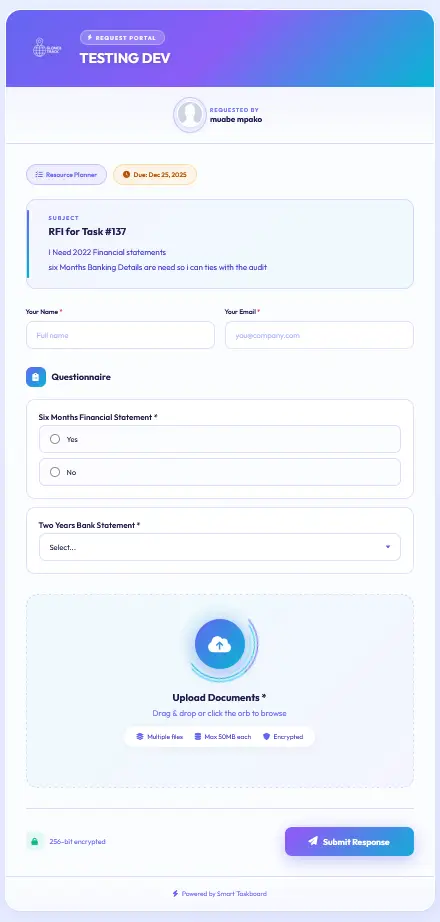
RFI Creation Flow
┌──────────┐     ┌─────────────┐     ┌─────────────┐
│   User   │────▶│   RFI Form  │────▶│ Validation  │
│  Input   │     │ Submission  │     │   Engine    │
└──────────┘     └─────────────┘     └──────┬──────┘
                                             │
                                      ┌──────▼──────┐
                                      │  Database   │
                                      │   Write     │
                                      └──────┬──────┘
                                             │
                                      ┌──────▼──────┐
                               ┌──────│   Email     │
                               │      │  Notify     │
                               │      └─────────────┘
                          ┌────▼─────┐
                          │ Document │
                          │  Upload  │
                          └──────────┘
Service Functions Reference
console_metrics()
Purpose: Aggregates KPIs for dashboard display
Returns: JSON object with response time metrics, open/closed counts, leaderboard data
{
  "total_rfis": 142,
  "open_rfis": 23,
  "avg_response_time": "2.4 days",
  "on_track": 89,
  "overdue": 12,
  "leaderboard": [
    {"name": "J. Smith", "closed": 42},
    {"name": "A. Johnson", "closed": 38}
  ]
}
console_table()
Purpose: Returns paginated RFI listing with sorting and filtering
Parameters: page, limit, sortBy, filters, searchQuery
async function console_table(params) {
  const query = applyFilters(baseQuery, params.filters);
  const sorted = applySorting(query, params.sortBy);
  const paginated = await applyPagination(sorted, params.page, params.limit);
  return {
    data: paginated.results,
    total: paginated.total,
    page: params.page
  };
}
Benefits Synopsis
- Complete Visibility: Real-time dashboard with all RFI statuses
- Performance Analytics: Track response times and team performance
- Proactive Management: Identify bottlenecks before they cause delays
- Delivery Health Monitoring: Track on-time vs overdue metrics
- Advanced Filtering: Multi-criteria filtering for targeted analysis
- Centralized Document Management: All attachments in one searchable location
- Bulk Operations: Process multiple RFIs simultaneously
- Permission-based Access: Role-specific views and actions
- Real-time Updates: Live refresh without page reloads
- Taskboard Integration: Connect RFIs to broader project management
Data Flow Diagrams
Console Dashboard Data Flow
┌─────────────┐    ┌─────────────┐    ┌─────────────┐
│   Browser   │    │   API       │    │   Database  │
│   Client    │    │   Gateway   │    │             │
└──────┬──────┘    └──────┬──────┘    └──────┬──────┘
       │                  │                  │
       │─1. Load Dashboard│                  │
       │─────────────────▶│                  │
       │                  │                  │
       │                  │─2. Fetch